
deskshare logo
Products
Download
Support
Support Forum

Ask questions and find solutions to common problems.


Technical Support

Your complete reference to product technical support.


Lost License Key

Retrieve your purchase history using our automated system.

Resources
Articles

Read expert insights on how to get the most out of our software.


Video Tutorials and Manuals

Learn new features and functions with our easy to follow videos and guides.

Contact Us
Contact Us

Your direct line to chat with us.


About Deskshare

Discover our story and values

| My Account -->
    Deskshare Support Forums
    • Recent
    • Popular
    • Login
    1. Home
    2. Deskshare-Tech
    3. Posts
    D
    Offline
    • Profile
    • Following 0
    • Followers 0
    • Topics 0
    • Posts 5
    • Groups 0

    Posts

    Recent Best Controversial
    • RE: Missing a virtual machine component

      The 24H2 update in Windows 11 introduced a new Virtualization security update (VBS) that blocks software virtualization in applications like IP Camera Viewer and Security Monitor Pro. We have a small app that will turn off the setting that prevents the software from running. You can download it here:

      https://deskshare.com/download/DisableVirtualizationBlocker.exe

      After running the app, you will need to reboot your PC and IP Camera Viewer will operate again.
      posted in Security Monitor Pro
      D
      Deskshare-Tech
    • RE: Can I control the phone from the web browser?

      ScreenCast allows you to have full remote control of your android device while viewing the screen in your web browser. The accessibility permission is required for remote control. We have a video that explains how to enable the accessibility permission.

      You can use the mouse to scroll and select items. Note that the mouse works the same as if you were using your finger on the screen of your device. A single click is the same as a tap to launch an app. The buttons on the bottom of the screen are provided in case the on-screen device buttons are hidden.

      posted in Screen Cast
      D
      Deskshare-Tech
    • RE: Explain how to view each camera on a full screen on my phone

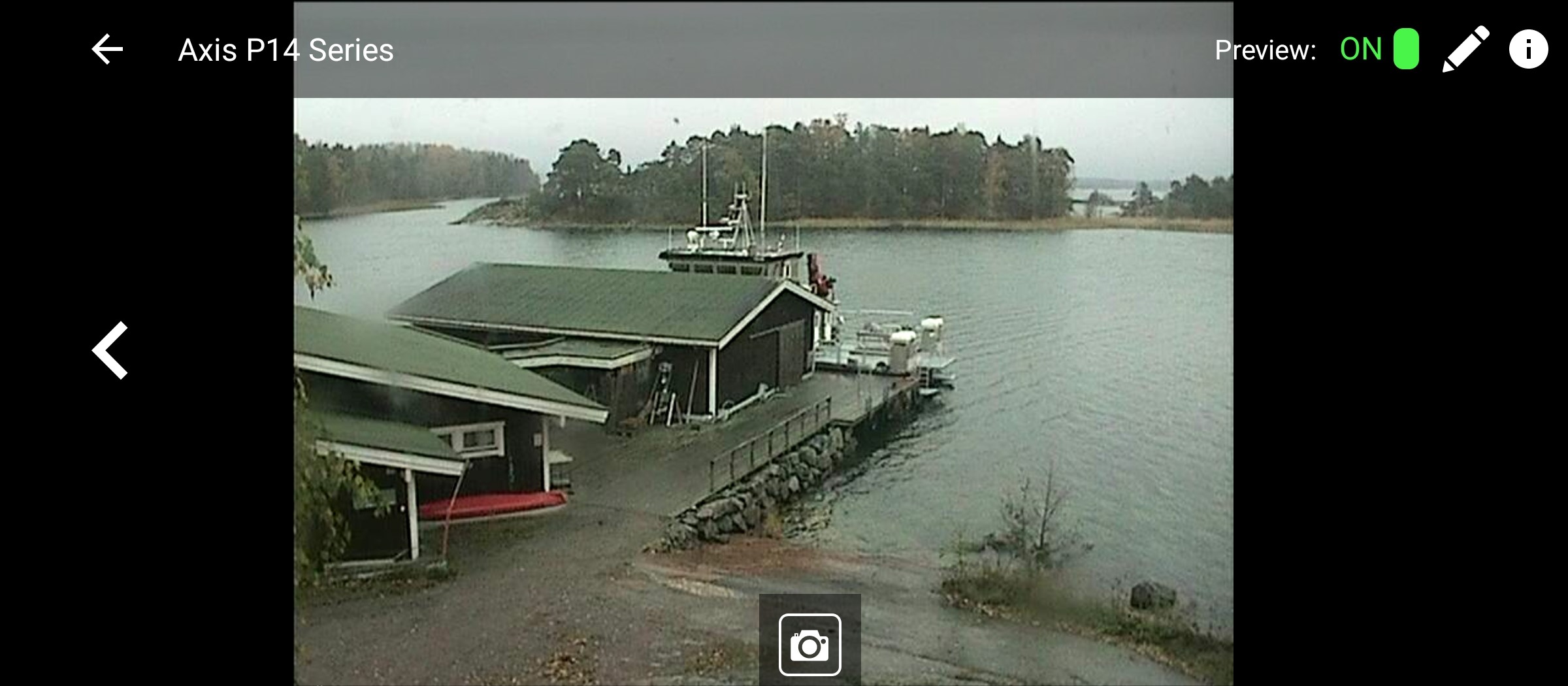
      Full screen view is available by tapping on the thumbnail preview on the main screen. Once you tap the preview, the live video will be displayed in landscape mode on your phone. Here is a sample of full screen view of a camera -

      [img=https://www.deskshare.com/forums/images/posts/IPCMpost6483.jpg]Full Screen view of camera connected to Security Monitor Pro[/img]

      If you have multiple cameras you can use the left and right arrows on each side of the screen to scroll between the cameras. The picture icon at the bottom can be used to take a snapshot of the live video on your screen.

      posted in IP Camera Monitor
      D
      Deskshare-Tech
    • RE: How can I test the app before purchasing it?

      There is no purchase required to use IP Camera Monitor with your IP Cameras. Download and install IP Camera Monitor from the Google Play Store. It will automatically scan your local network and list all of your IP cameras found on your local network. You can add any of the found cameras to IP Camera Monitor and start using them immediately. You can also add a camera manually if it is on the internet or if a camera is not found on your local network. To add a camera manually, you will need the IP address, manufacturer and model number, and the username and password. This video explains how to add a camera to IP Camera Monitor.

      I recommend pairing IP Camera Monitor with the desktop app Security Monitor Pro to remotely live-view all the cameras from your home or business. You can also view recordings, photos, and more. Connecting to Security Monitor Pro requires purchasing the app, all other features are available without purchase.

      posted in IP Camera Monitor
      D
      Deskshare-Tech
    • RE: Delay in emails sent to exchange server addresses

      Auto FTP Manager sends emails messages immediately upon completion of the automated transfer.

      Usually emails sent within the same domain are delivered the quickest, for example from your gmail account to another gmail account. When you send from gmail to an address on a Microsoft Exchange server there will be transmission delays depending on how busy the gmail and exchange server networks are.

      To speed up the email reception, try using the SMTP address on your Microsoft Exchange directly. This should deliver to your email account faster. Alternatively, you can send the notifications to another address on Gmail.

      posted in Auto FTP Manager
      D
      Deskshare-Tech
    • 1 / 1