
I want to view my phone camera remotely
-
I would like to help my customer configure a new machine that he is installing in his warehouse in New York. I am in California.
Will your app be able to give me a remote view while I provide guidance over the phone?
-
Using IP Phone Camera, you can easily view what’s happening beyond your local network.
To see what’s happening at customer’s place, you have to tell your customer to install the IP Phone Camera app on his mobile device and start broadcasting. The mobile device will act as a camera and you will be able to view it directly from your office. The device should be set in a proper position so that you can see how best to help the customer.
To start broadcasting from the mobile device when there is no Wi-Fi available, open the application, select ‘Mobile Data’ and click ‘Start Broadcasting’.
If you want to view the mobile camera remotely, you should know the login details from the application. Tell your customer to share the login details with you.
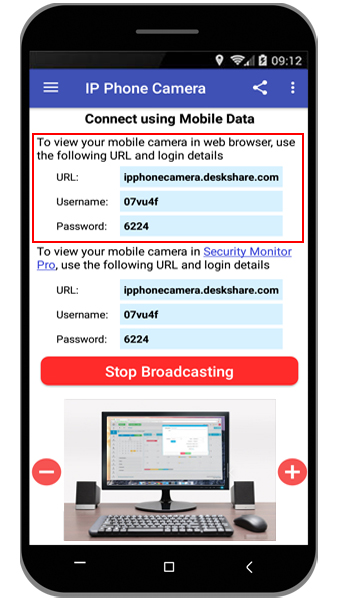
Once you have the login details, enter the URL in your browser. You can use any device with a browser such as a PC or Android device. Then enter the ID, password and click Login.
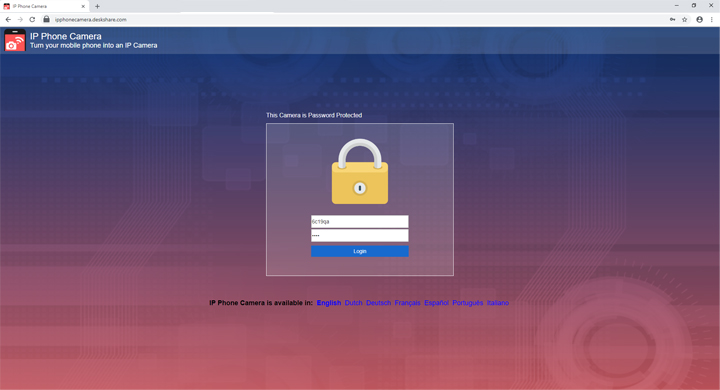
Once the connection is established, you can see what is happening at customer’s place and help him do the configuration.