
Auto start file conversion for newly downloaded video files
-
Every day I download new video files to my PC, then I convert the downloaded files to WMV format. Can I configure Digital Media Converter Pro to automatically start the conversion of newly downloaded files once a day?
-
Digital Media Convertor Pro can automatically start the conversion of your files on a schedule. You can monitor selected folders and schedule your conversion at a specific time.
To configure the settings for this, go to Tools >> Folder Watcher. Check the option to Enable Folder Watcher and browse for the PC folder where you keep newly downloaded video files. To schedule conversion, specify the time to start conversion under the ‘Choose Conversion Time’ section. Next go to the ‘Conversion Options’ section and select the output format to convert your files. By default WMV format is selected. Click OK to save your settings.
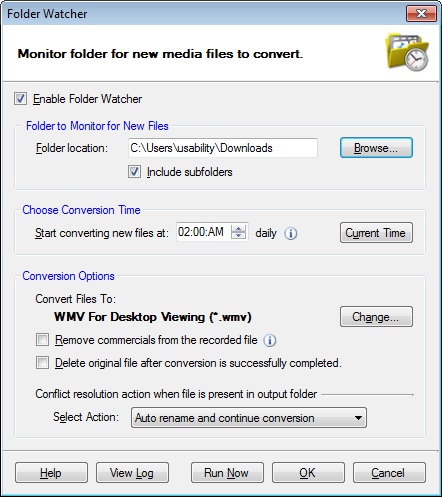
All your newly downloaded media files present in selected PC folder will be converted to WMV format at the scheduled time.