
Capture only the mobile screen during recording
-
I am using Screen Cast with My Screen Recorder. I want to record my mobile application presentation. I don't want my PC screen to be shown in the video. Can I do this with your software? 96.232.201.191 2017-11-30 05:38:02.313 22 0 1 1 NULL 729 Günter Kieninger
-
My Screen Recorder provides an option to Lock to window. This will record only a selected window.
To use this, open My Screen Recorder and click the 'Record' icon on the toolbar. Select the Custom region option from the 'Record Screen' dropdown list. Then select the Record mobile screen option and enter the login details. Click Ok to start recording.
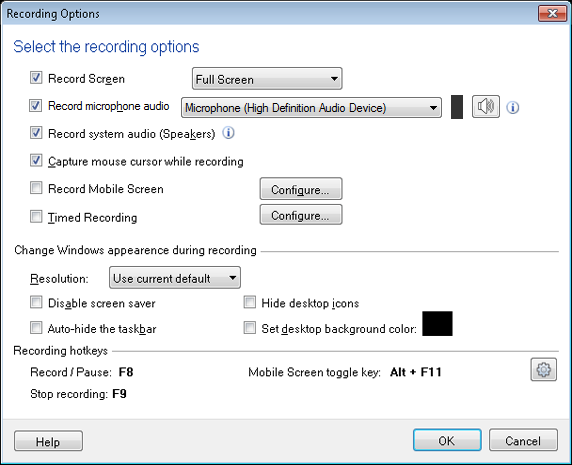
You should see the mobile screen along with your PC screen. Click on the mobile screen and the region selection box will appear on the screen. Select the Lock to window option and click the Start Recording button on the ‘Region Selection’ dialog.
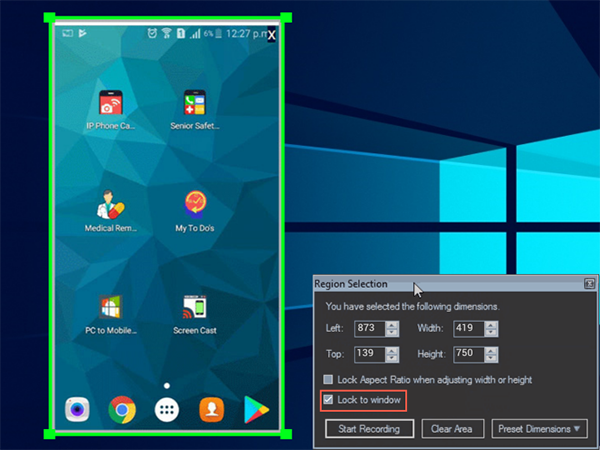
On selecting the option to Lock to window, the mobile screen resizes to stay within the recording boundaries.