
Download files which only have a single character in the file name
-
How do I use Auto FTP Manager to download files with just a single character in the file name like 'a.txt' or '7.doc'? I don't need to transfer the other files on the server.
-
You can use the File Name filter option in Auto FTP Manager to download files having a single character in the file name.
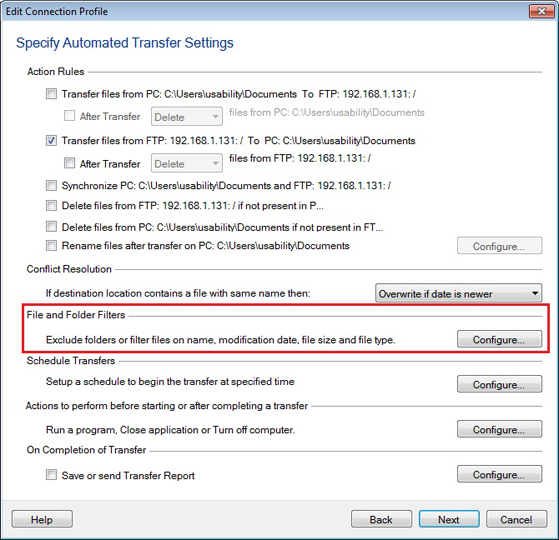
First, create the Automated transfer profile from File >> New Connection Profile. Enter the details required to connect to the FTP server, including FTP address, port number and authentication details. On the Automated Transfer Settings page, select the option to transfer files from ‘FTP server’ to ‘PC folder’. Go to the File and Folders Filters section and click on the Configure button.
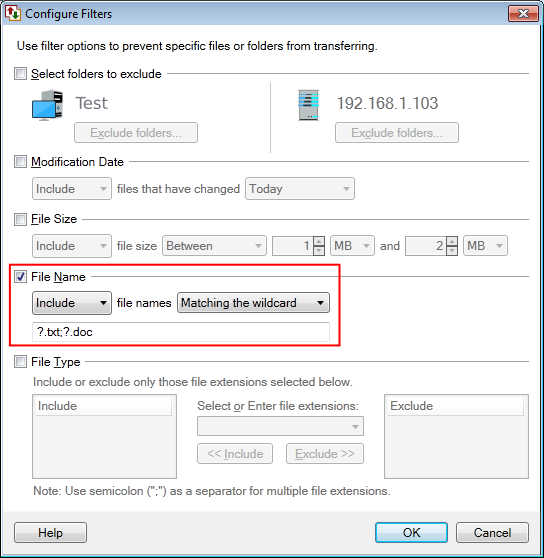
Select the File Name filter type and set it to Include file names matching the wildcard. Enter the pattern as “?.txt” and “?.doc” separated by a semicolon. A question mark "?" matches any one character, so all the file names with single character will be included. Click Ok to save the filter settings. Move to the next page, and enter the profile name to complete the profile creation process.
A profile name will be listed on the left side panel, right click on it and start the automated transfer. The files having names like a.txt and 7.doc will be downloaded. You can also add a schedule to start the transfer.