
Automatically downloading only the large files from FTP server
-
I have configured Auto FTP Manager to auto download files from FTP server. I want to download only the files above size 50MB. Is there any way to only transfer the large files?
-
Use the File and Folder Filter in Auto FTP Manager to automatically download files greater than 50MB or any size you specify.
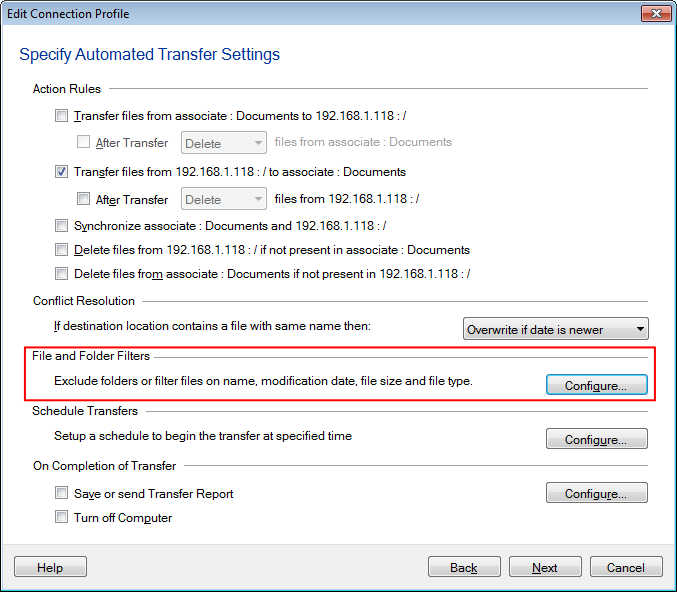
To configure these settings, right click on the profile name listed in the left panel and select the Edit Profile option. Navigate to the **‘Specify Automated Transfer Settings’ **page. Look for the File and Folder Filters section and click on the Configure button.
Select the File Size filter option and set it to Include file size greater than 50 MB. Click Ok to save your settings, and navigate to the next page to finish.
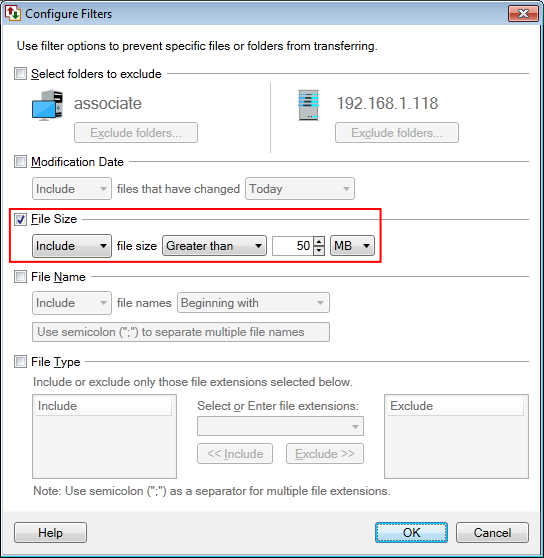
When you now start the automated transfer, only the files having a size greater than 50 MB will be downloaded.