
Transferring files on alternate days
-
I want to automate the file transfer and I think your FTP software will work for me. I want to know if it is possible to transfer the files on every alternate day.
-
Using the scheduler in Auto FTP Manager, you can automatically transfer files on alternate days.
To add a schedule, you have to create an automated transfer profile. Click File >> New Connection Profile. Select connection profile type as Automated Profile.
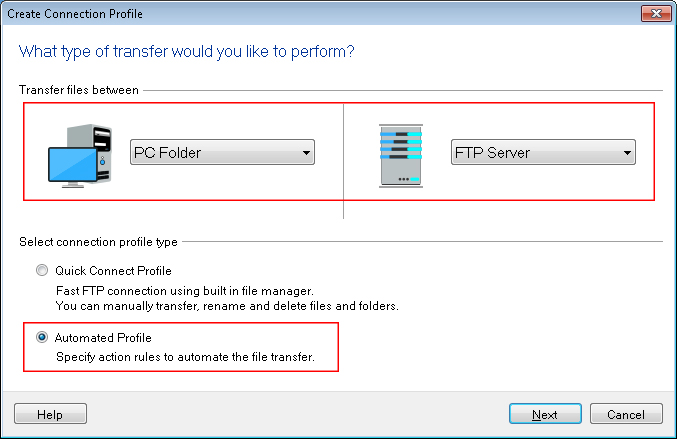
On next page, enter all the FTP server details required to make a connection. On the Action rules page, select the transfer action.
Under the Schedule Transfers section, click on the Configure button to add a new schedule. Select schedule type as Daily. Enter start date and time, then set the Repeat interval for 2 days. Click Ok to save these settings. Navigate to next page and create the profile.
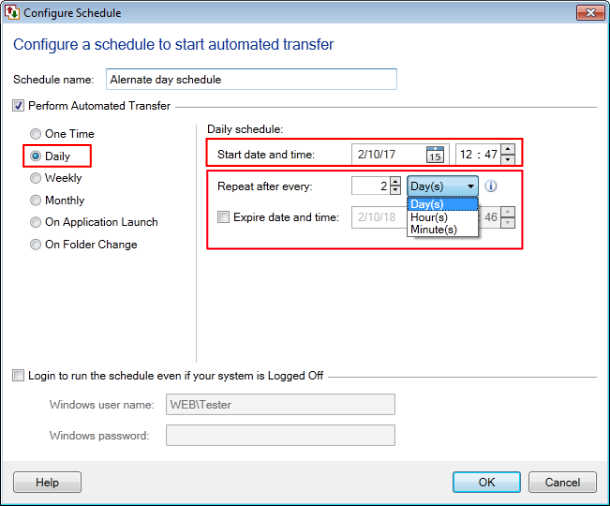
The schedule will run at a specified date and time and file will be transferred automatically on alternate days.