
Save a picture from my webcam to a network folder every 30 seconds
-
I want to take pictures from the webcam and save it to a network folder. Photos to be captured with the time gap of 30 seconds for a weather reporting project. How can I use WebCam Monitor to do all these settings? Need help!
-
You can take pictures in WebCam Monitor at regular intervals of 30 seconds.
Here are the steps you need to follow:
-
From Quick Access select At regular interval option. Enter 1 in the numeric up-down control box and press the down control to set the 30 second value.
-
Select the Take Photo action and click on the Configure button for Take Photo.
-
Enter 1 in both the numeric up-down control box in this dialog and click OK
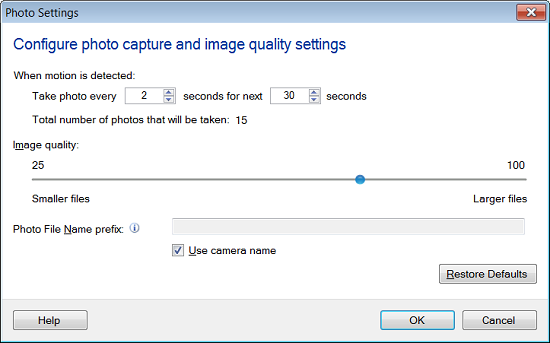
- Now, click the 'Settings' icon on the tool bar you will see the following dialog
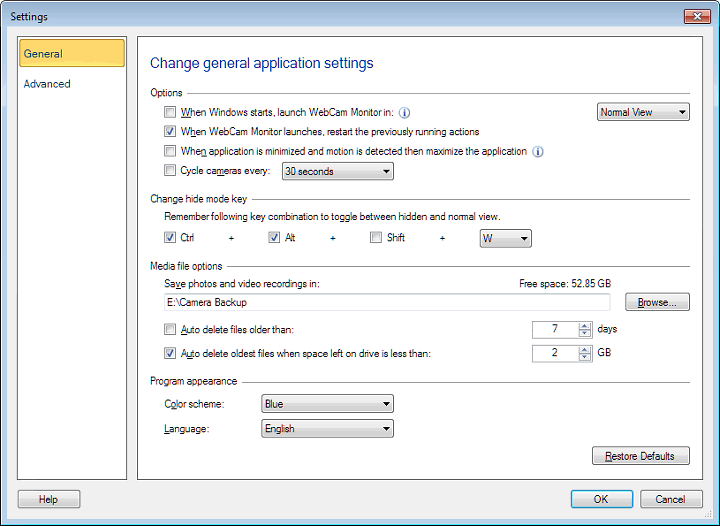
Enter the network folder location in the path control under Media file options.
- Click on **Start Monitoring **button on Quick Access
Photos will be captured at regular intervals of 30 seconds and will be saved in network location folder.
-