
Automatically changing the filename while downloading
-
I have been using Auto FTP Manager for years and I must say, you have a very good product. I have a question and I hope that you can help me with. Once I download a file from FTP to the local computer, is there a feature that will automatically rename the file?
For example, I have a recurring download, the file name is 1200.mp3 and a new version is created daily. After downloading, I would like it renamed so when I download it the next day, it will not overwrite yesterday's file.
Thank you for your time!
-
Auto FTP Manager can automatically rename the file so that you have a history of the older versions of your file using conflict resolution.
Here is how to turn this feature on: Edit your Automated Transfer profile and go to the Automated Transfer Settings tab. Under the Conflict Resolution section, look for the drop-down and select 'Appens Date-Time' option. If destination location contains a file with the same name then date and time will be appended.
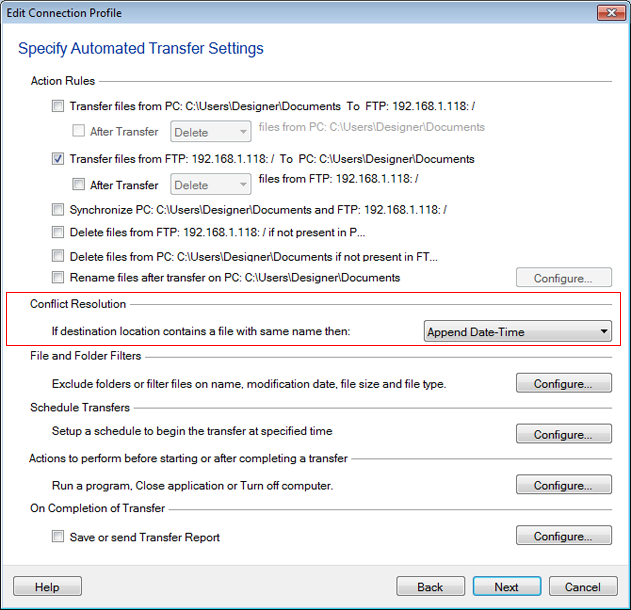
Each day when you download the file, it will be renamed as 1200-[current date].mp3.