Transferring files between two mobile devices
-
I want to exchange files between two mobile devices. And I want to control this transfer directly from my computer. Can Auto FTP Manager do this?
-
Auto FTP Manager makes it easy to transfer files between two mobile devices directly from your computer.
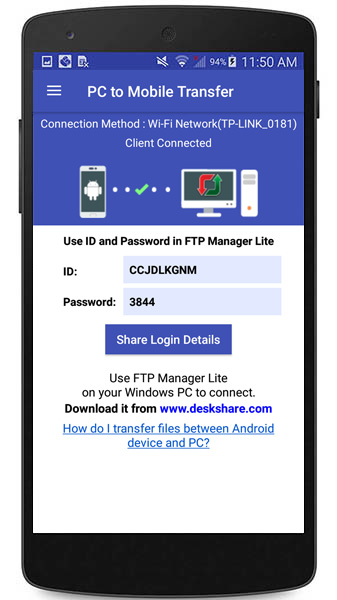
On both mobile devices, install the PC to Mobile Transfer application. Open the app and note down the ID and password shown on each of the devices.
[img=https://www.deskshare.com/forums/images/posts/AFMpost6227.jpg]PC to Mobile Transfer ID[/img]
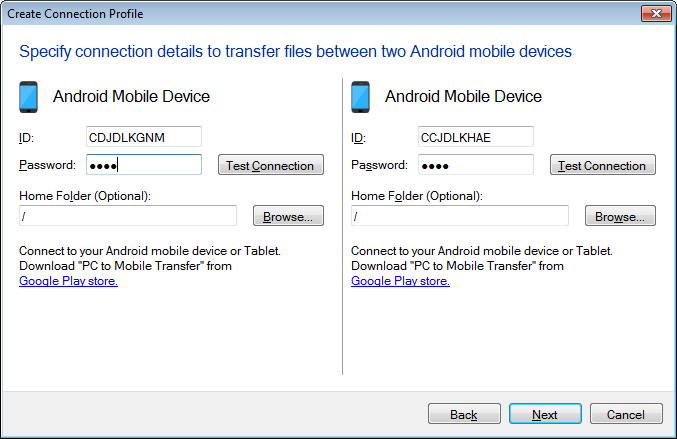
Next, create a connection profile in Auto FTP Manager. Go to File >> New Connection profile and select the option ‘Android Mobile Device’ from both the dropdowns. You can select Quick Connect or Automated Profile. Next, enter the ID and password for both the devices and create the connection profile.
[img=https://www.deskshare.com/forums/images/posts/AFMpost6227-1.jpg]PC to Mobile Transfer Connection[/img]
Once the profiles are created, you can transfer files between the Android mobile devices directly from your computer.