
Automatically start transfer when PC folder is modified
-
I am using Auto FTP Manager to download files from my FTP server to a PC folder for processing. After the file is processed on the PC folder, it gets deleted. Is it possible to automatically start a transfer from the FTP server when I delete something from the PC folder location?
-
You can use the Auto FTP Manager Scheduler to watch the PC folder. It can automatically start transferring when files are created, updated or deleted from the watched folder.
Follow the steps to configure schedule:
-
To create automated transfer profile, click File >> New Connection Profile. Select connection profile type as Automated Profile and enter FTP details. Navigate to next page and look for Actions Rule section. Select the option for downloading files.
-
Now, from Schedule Transfers section and click on Configure button. Select Perform Automated transfer option and schedule type as On Folder Change.
-
Browse for the PC folder you want to monitor. Select Deleted checkbox to monitor for deletions in the PC folder.
-
Set the waiting time with the help of the Wait {N} minutes before starting transfer option.
Now, when a file is deleted from the watched folder, Auto FTP Manager will wait for the selected time interval and start downloading files from the server.
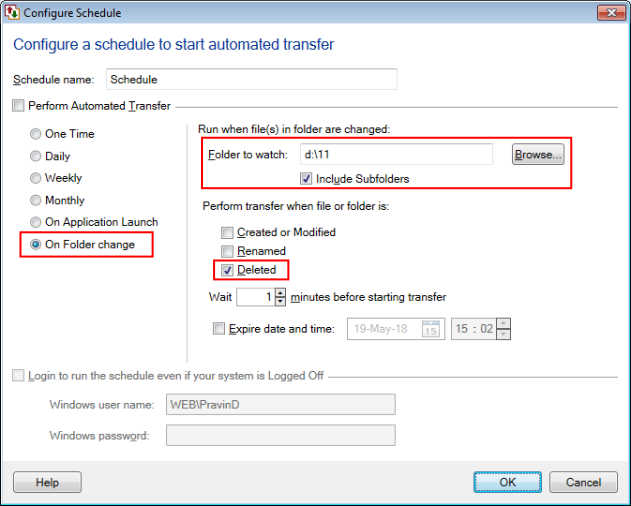
This schedule gets invoked whenever file gets deleted from the selected PC folder.
-