
Using a separate audio device with my USB webcam
-
Can I use a separate audio device to record audio while recording video from my USB camera?
-
WebCam Monitor allows you to record video from your webcam and simultaneously record audio from a different device.
Here's how: Add your USB camera in WebCam Monitor. Next, connect the audio device to your PC. This can be a built in microphone or even a wireless microphone. Go to the Edit camera dialog and select your audio device from the drop down list. Click on the play button to listen to the audio.
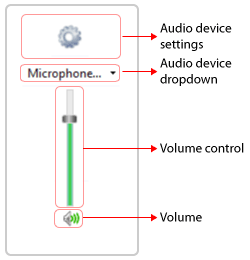
Click OK, and that's it. Now you will be able to record audio from the separate device along with video from your USB camera.