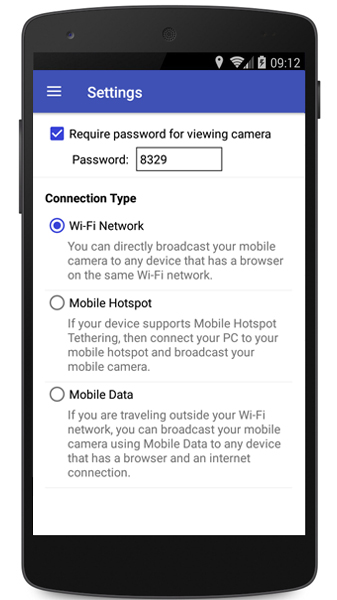
Selecting the connection type in IP Phone Camera
-
I want to use IP Phone Camera to monitor my home. But I am not sure whether to use WI-FI or Mobile hotspot to see the camera preview continuously?
-
Using IP Phone Camera you can view the mobile camera on any device that has a browser.
If you have Wi-Fi turned on and you are in the same network as your PC then use connection type ‘Wi-Fi network’. If you don't have a Wi-Fi connection, connect your PC to your mobile hotspot. If you want to view your mobile camera remotely from anywhere then you have to use ‘Mobile Data’.
To select the connection type, go to Settings in IP Phone Camera and choose the Connection Type as 'Wi-Fi Network', 'Mobile Hotspot' or ‘Mobile Data’.
You can easily switch between connection types depending on the network of your mobile device and PC.