
Download files with filenames that contain the words 'new' or 'review'
-
I want to only download files which contain strings like ‘new’, ’review’ in their name. How can I do this using Auto FTP Manager?
-
Auto FTP Manager allows you to download only those files which contain strings you specify by using the Files and Folders filter option.
First, create an Automated profile for downloading files from the FTP server and then you can configure the filters for that profile.
To create a automated transfer profile, click File >> New Connection Profile. Select the connection profile type as Automated Profile.
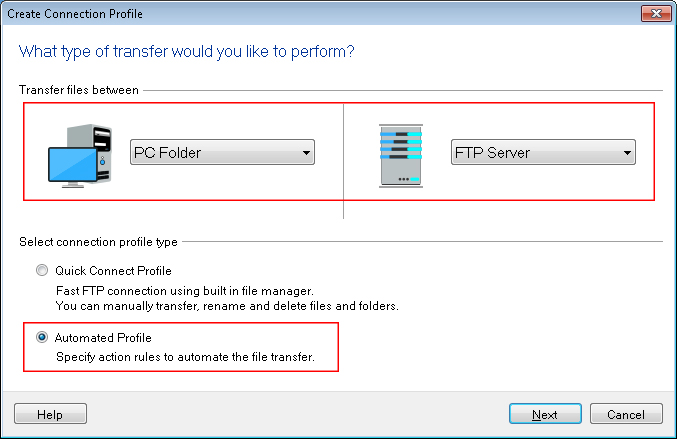
Enter the FTP details such as FTP address, port number, username and password. Navigate to the next page, look for the Action rules section and select the transfer actions for downloading files.
Next, look for the Files and Folders filters section and click the Configure button. Select the filter for File Name and set it to 'Include file names containing string values'. Enter the words that you want to search in the file name like 'New' and 'review'. Use the semicolon to separate the words. Click OK to save these settings. Go to the next page and click Finish to create a profile with configured settings.
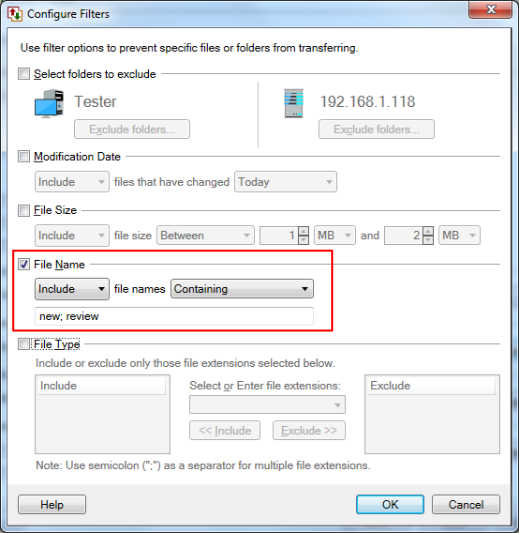
Now, whenever you start automated transfer, the files containing the specified strings such as 'New' and 'review' in the file name will be downloaded.