
Transferring files that are changed within last hour
-
I want an FTP client to transfer the files that have changed within the last hour. Can I use Auto FTP Manager for this purpose?
-
In Auto FTP Manager, you can transfer recently updated files based on modification date and time with the help of File filters.
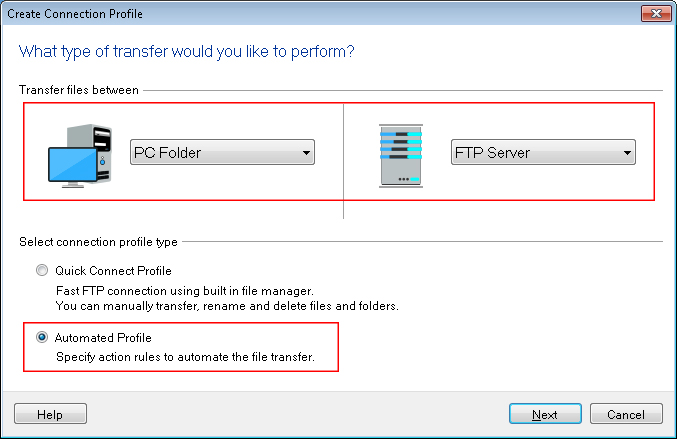
To configure the settings for filters, you have to create an automated transfer profile. Click File >> New Connection Profile. Select connection profile type as Automated Profile.
On the next page, enter all the FTP server details required to establish a connection. On the Action rules page, select the transfer action. Click on the Configure button under the ‘File and Folder Filters’ section and select Modification date filter type. Set it to Include files that have changed In the last 1 hour. Click Ok to save these settings. Navigate to next page and create the profile.
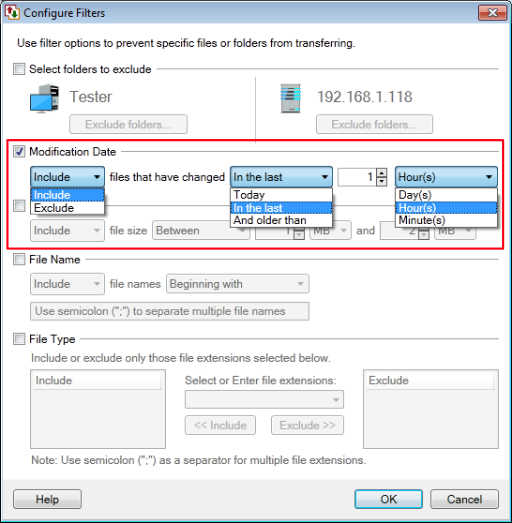
Whenever the automated transfer is performed, only the files that have changed within last 1 hour will be transferred.