
Save hard drive space by moving your files to a FTP server
-
I use many different applications everyday on my PC, many of them generate log files on my
 drive which I have to send in for review at the end of the day. I don't have a lot of space on my drive, I would like to save disk space on these log files. Is there any way that Auto FTP Manager can be used to solve this issue?
 -
You can use Auto FTP Manager to upload your files to the FTP server and delete those files from your PC after transfer.
Here are the steps:
-
Create a Automated transfer profile, select PC folder to FTP server
-
Right click on your automated transfer profile name from 'Profile List' and select 'Edit Profile...'
-
Go to 'Transfer Rules' tab and select the action rule "After transfer delete files from [PC folder]"
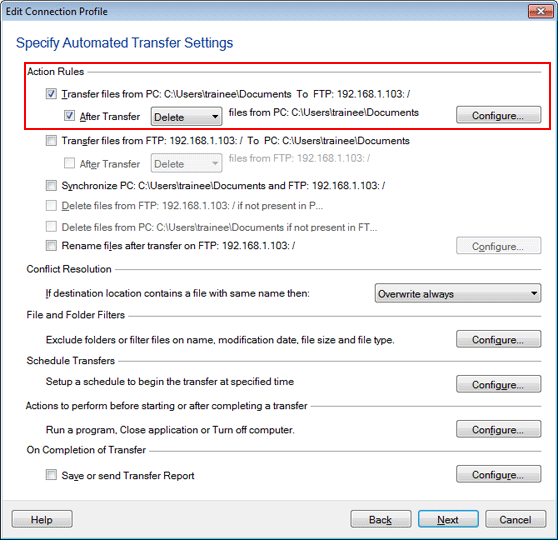
- Add a schedule by clicking on 'Configure' button under 'Schedule' section
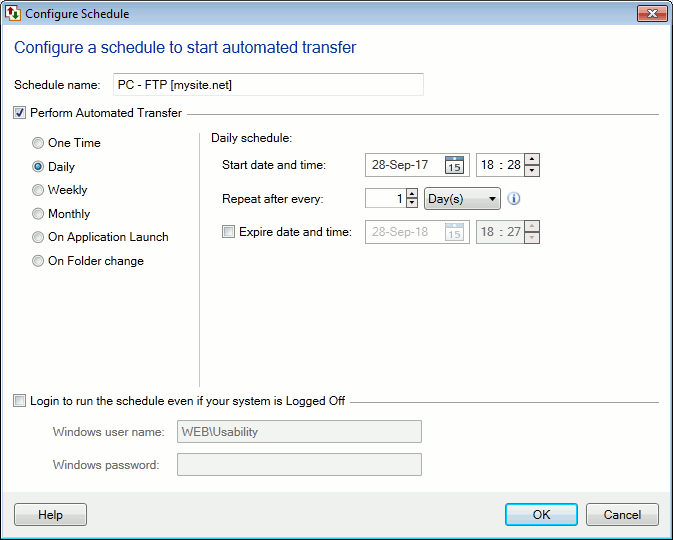
You will have all your files on the FTP server and the files will be deleted from your PC. This will save your disk space and you can send your files for review anytime.
-