
Saving the converted audio files on network location
-
I am looking for a text to speech application to convert text file to audio format. I found Text Speaker after doing some research. I have a question- Is it possible to save the converted audio files directly to a network folder?
-
Text Speaker can convert text file to audio format and save the converted audio file to any local or network folder or network path.
To start the conversion, open the text file in Text Speaker and click on the Convert to Audio option from the toolbar. On the Audio Properties dialog, look for the Destination Folder section and enter the network folder location. Click OK to start the conversion.
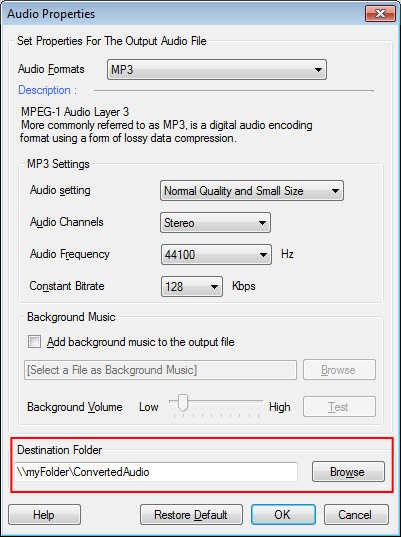
The converted files will be saved directly to the network folder. You can change the folder location if you want to save the file on a different location.