
Adjusting a voice to make it sound different
-
I have two Ivona voices installed on my computer and those work well with Text Speaker. I have used both of them a lot. Now, I want to use a different voice to read a text file. Can I change the properties of the installed voice to make it sound different?
-
Text Speaker allows you to adjust the volume, pitch and speed of an installed voice. Adjusting the voice properties will help you generate a voice that will sound different than the original voice.
To adjust the voice properties, go to Tools >> Voice. Change the volume, pitch and speed values using the slider. Click the Test Settings button to listen the text sound.
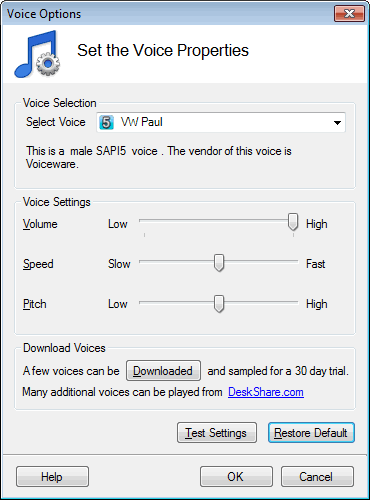
Adjusting the voice properties may also make the reading more understandable.
Please note that the changes done on the Voice Options dialog apply to the entire document read by Text Speaker.