
Disable the previously running actions when I start Security Monitor Pro
-
Every time I launch Security Monitor Pro, the monitoring actions which were running previously are automatically started. Is it possible to stop these actions which get triggered when I open the application?
-
By default, Security Monitor Pro will always start the previously running actions when it is launched. You can disable this option from the Application Settings.
Click on the Settings icon from the tool bar. On the General settings tab, uncheck the Restart previously running actions on application launch option. Click Ok to save the changes.
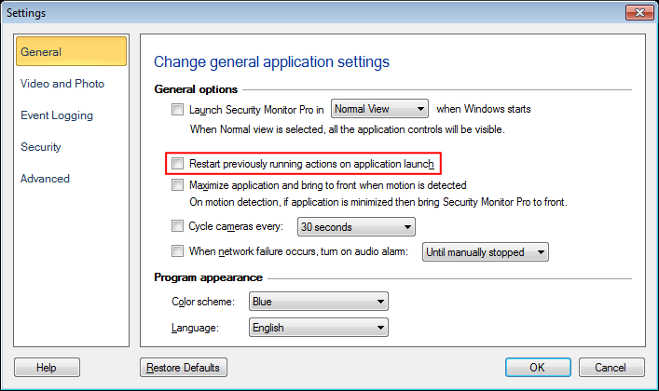
The next time you start Security Monitor Pro, please note that the previously running actions will not be started. You can also check if you have added any schedule to run monitoring actions on application launch. Disable that schedule if you don’t want to start the actions on application launch.