
Capture photos from my IP camera every second
-
I have configured the Take Photo action in Security Monitor Pro for my camera. I see that it captures a photo every 2 seconds on motion detection. Can I set it to take a photo every second?
-
You can change the image capture interval from the Photo Settings in Security Monitor Pro.
To change the settings, right click on the camera preview and select ‘Edit Camera’ option. On action tab, click ‘Configure’ button for Take Photo action. Enter the value 1 in the numeric text field as shown below and click OK button.
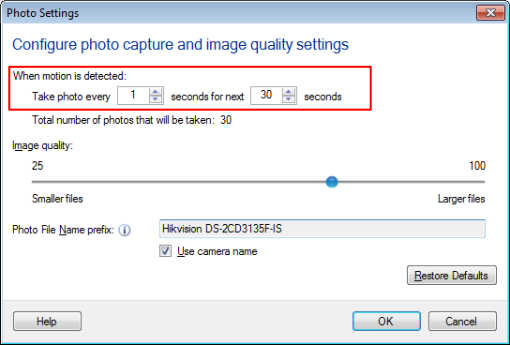
Once you complete the settings, start the monitoring action. You will notice that the photos will be captured every second when motion is detected. Note that the interval value should be in the range from 1 second to a maximum of 5 seconds.