
Display the time on a motion detection screen recording
-
I record the PC screen on motion detection, but it's hard to tell when each user interaction occurred, as I am recording only a part of the screen. Is there any way I can have the time label showing exact occurrence of a motion event?
-
You can add an annotation in My Screen Recorder Pro which displays the time in your recording.
To add the time annotation, go to the 'Effects' menu and choose the 'Time and Text Annotations' option. Select the checkbox to 'Display system date and time' and the date-time format from the drop down. Click on Edit button to adjust the position of the text annotation.
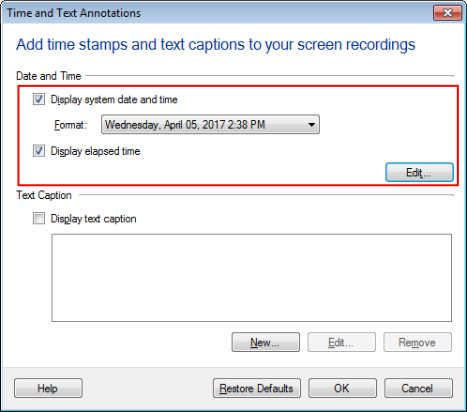
You can also display the elapsed time. It shows the time that has passed since the recording began.
Now your screen recording will contain the time at every motion event.