Allowing only a single connection to the Security Monitor Pro broadcast stream
-
I am using Security Monitor Pro for broadcasting the feeds from my IP cameras. I want to make sure that only a single person is allowed to view the stream and no one else can watch it. Can I do this?
-
Security Monitor Pro allows you to restrict the number of viewers watching your IP camera's live broadcast.
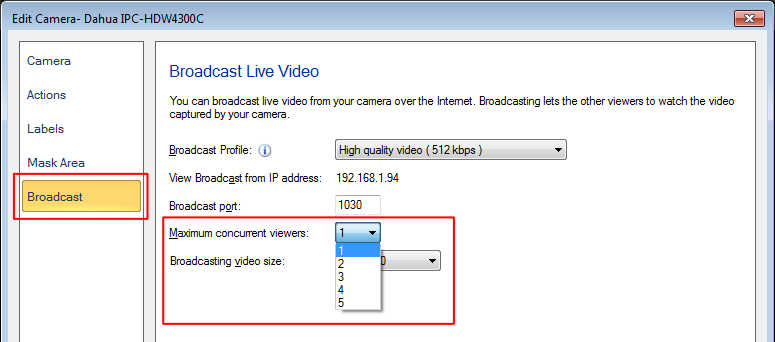
To allow a single person to view the stream, click Manage Cameras icon from the tool bar, select the camera and click 'Edit Camera'. On Broadcast tab, you need to choose the value 1 in the ‘Maximum concurrent viewers’ drop down list and save it.
On broadcasting the camera stream, the application will allow only 1 user to watch the live preview. You can also set the Broadcast Profile and Video Size.