
Reading a text message at a specified time
-
I am using Text Speaker for converting text files to mp3 audio files. Can I use Text Speaker to read a text message at a specific time or on a schedule?
-
Yes, this can be done with the help of Talking Reminders in Text Speaker. Click on the ‘Talking Reminder’ icon on the tool bar. Then click ‘Create’ in the Talking Reminder dialog. Type the message in the Message section on Reminder Details dialog.
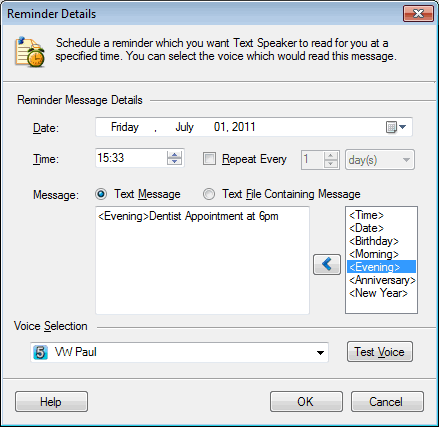
Enter the date and time. You can repeat the message after every N minutes/hours/days or years. Choose a voice and test it using the ‘Test Voice’ button.
For more information on Talking Reminders please see this link:
https://www.deskshare.com/help/ts/Reminders.aspx