Playing back video recordings at different speeds in Security Monitor Pro
-
Does Security Monitor Pro allow to playback video recordings at different speeds? It will be very helpful when some activity is recorded and I have to review it. I can slow down the playback speed to check the video in detail.
-
You can adjust the playback speed from Media Analyzer in Security Monitor Pro.
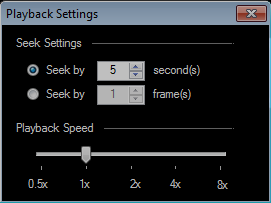
Select the 'Media Analyzer' option on tool bar and maximize the media analyzer window. Click on ‘Playback Settings’ icon from the preview controls.
On Playback settings, you can adjust the playback speed using the slider. This will change the playback speed instantly for the video being played.