
Capture motion on the screen along with a time stamp
-
I want to make a screen recording only when changes occur on the screen and preferably with a time stamp of the event. Is it possible to do this using My Screen Recorder Pro?
-
To be able to detect the changes occurring on screen you can configure My Screen Recorder Pro for motion detection recording. In motion detection recording, My Screen Recorder Pro will watch your PC screen, the selected application window or a capture region for any changes.
To configure motion detected recording, click on Tools >> Settings >> Recording Options. Select 'Advanced Screen Recording Options' and then choose Record when screen motion is detected.
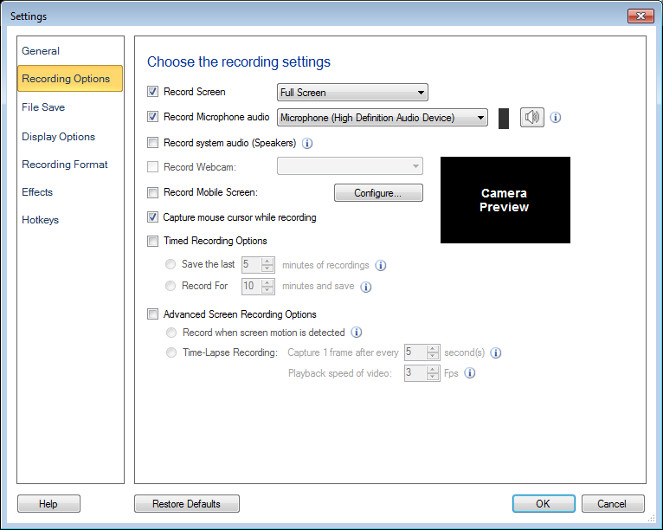
To put the time stamp on your screen recording, click on the 'Effects' menu and select 'Time and Text Annotations' option. Select 'Display system date and time' and date time format you want.
This will record your screen with date and time stamp whenever motion is detected.