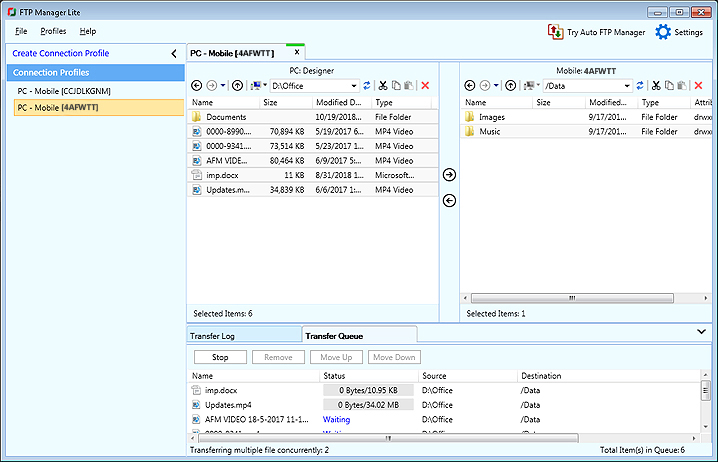
Transfer files using mobile data when the mobile device is beyond the local Wi-Fi network
-
I want some files from my friend's mobile who is living in another city. Can I accomplish this with PC to Mobile Transfer?
-
PC to Mobile Transfer allows you to transfer files when your device is outside the local Wi-Fi network.
On your PC, please install FTP Manager Lite software.
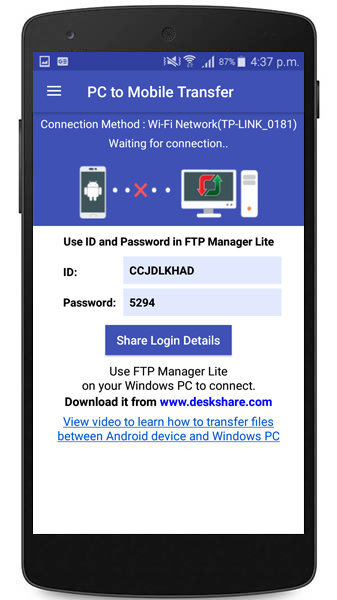
Open the PC to Mobile Transfer app, go to the Settings and select Mobile Data option. Make sure your device has an active data connection. You will require the ID and password to establish a connection between the mobile device and the PC. Note the ID and Password from the home page of the application.
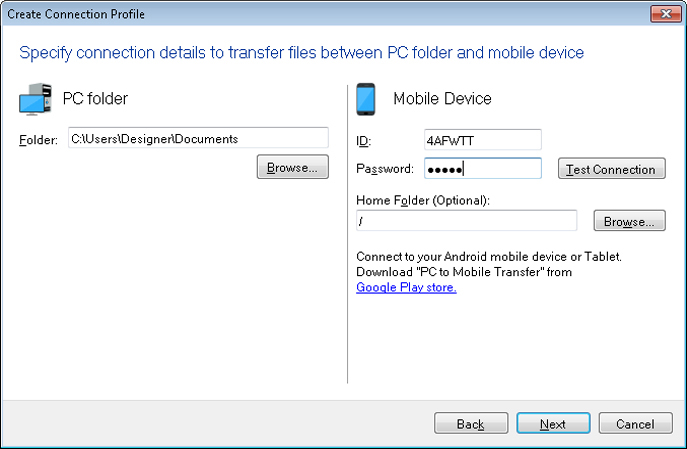
Next, open FTP Manager Lite on your Windows PC and click File >> New Connection Profile. Select Transfer files between a PC folder and a Mobile device. Navigate to the next page and provide the path of the PC folder and enter the Mobile connection details. Enter the ID and password from your Android device. Then click on Test Connection to check whether the connection with your mobile device is successful.
Now you can transfer files even when your device is not with you, by using PC to Mobile Transfer.