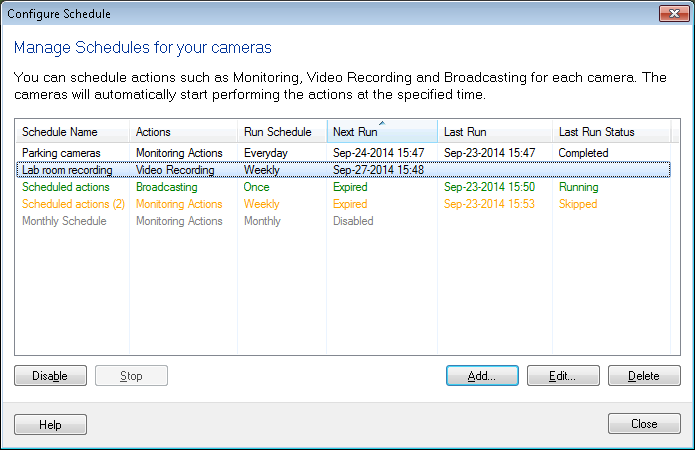
What do the color codes on the schedule window mean?
-
Security Monitor Pro is working great for me. I have set it to perform monitoring on a schedule, and I have added several schedules. I see there are some color changes for the schedules. What exactly these colors signify?
Thanks for your assistance.
-
Security Monitor Pro shows different color codes to indicate the status of the schedules.
There are four color codes used: Black, Green, Orange and Gray.
Black: Indicates a schedule is active and is waiting for its next run to execute or the schedule is completed.
[color=green]Green[/color]: Shows a schedule is currently running.
[color=orange]Orange[/color]: This color signifies that a schedule is expired and will not run again.
[color=olive]Grey[/color]: This color mark shows that a schedule is in disabled state.