
Text to Speech for proofreading a long book
-
Yesterday I proofread 10 chapters of my book containing 30 chapters. I want the program to start the reading from chapter 11, but starts reading from the beginning of book. How do I restart the proofreading at chapter 11?
-
When reading long e-books, you can easily return to the point where you left off by using the bookmark feature in Text Speaker.
Follow these steps:
- Click Edit menu >> Add Bookmark. Give the bookmark a name.
- When you want to return to a bookmark, click Edit menu >> Go to Bookmark and choose a bookmark from the dropdown.
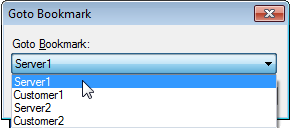
- After returning to the required position, click Speak menu >> Speak from Current Cursor Position. Now, Text Speaker will start reading from the point where you have added a bookmark.