Changing the screen recording playback speed
-
I want to quickly review a screen recording created in My Screen Recorder Pro. Is it possible to set a higher playback speed while reviewing the recorded video?
-
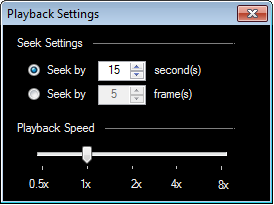
You can change the video playback speed in My Screen Recorder Pro from the playback settings. This will help to quickly review a recorded video.
To change the playback speed, click Play >> Seek Settings to open the Playback Settings dialog box. Use the slider to set a higher speed for video playback. The maximum playback speed value is 8x. Once you set it, the screen recording will be played at a faster speed and you can review it quickly.